+1 (408) 900-9133
 sales@thecodevision.com

7 Power Pages Design Studio Features Every Low-Code Developer Should Know

-
Ashish Chotalia
-
09 Dec, 2025

-
Power Pages


Many organizations today are moving toward low-code platforms to build business applications faster. As teams rely more on automation, self-service portals, and secure data experiences, Microsoft Power Pages has become a natural choice—especially for companies that want speed without losing reliability.
But as low-code development grows, developers often realize that not all features inside Power Pages get the attention they deserve. Some of the most powerful tools remain underused simply because teams aren’t aware of how much they can do.
At Codevision Technologies, we work with businesses that build portals for onboarding, customer service, community access, vendor applications, IT requests, and so much more. Over time, we’ve seen a clear pattern:
The developers who understand these seven Design Studio features deliver cleaner, faster, smarter portals with less rework.
This blog goes deep into each feature, why it matters, and how low-code developers can use it to build stronger solutions.
Understanding Power Pages Design Studio

Power Pages Design Studio is the workspace where developers create, style, secure, and integrate business portals. It’s more than a drag-and-drop tool—it’s a structured environment where visual design, data modeling, security rules, and automation come together.
The process usually starts with:
- Reviewing the solution requirements
- Identifying what needs to be captured from users
- Mapping out Dataverse tables
- Planning forms, logic, and access permissions
Once this foundation is clear, the Design Studio helps teams turn ideas into working, data-driven apps—without writing long custom code.
Let’s walk through the features that matter most.
1. Visual Page Builder for Faster Layouts
The visual page builder is where most developers spend their time. It allows you to create pages using a clean drag-and-drop interface without touching HTML or CSS unless you want to.
This becomes especially helpful for teams building portals such as:
- Service request portals
- Membership sites
- Knowledge bases
- Event or appointment systems
Key benefits:
- Clear, modular structure for each page
- Real-time visual preview
- Easy section management (columns, rows, containers)
- No dependency on UI designers
- Great for rapid prototyping and instant stakeholder feedback
At Codevision Technologies, we’ve seen clients approve layouts 3x faster simply because the visual preview removes uncertainty.
2. Multi-Step Forms With Conditional Logic
Many portals succeed or fail based on how well the forms are designed. Long forms overwhelm users, but breaking them into steps makes the experience much more natural.
Power Pages lets you design:
- Multi-step forms
- Conditional sections
- Logic-driven form behavior
- Validation rules
- Data-integrated fields
This is ideal for processes such as:
- Job applications
- Loan or grant applications
- Supplier onboarding
- Customer service requests
What makes this powerful:
- Users only see fields relevant to them
- Complex processes feel lightweight
- Data flows directly into Dataverse
- You can adjust form rules without rewriting large components
You’ve probably seen this before — users are far more likely to complete a form when it’s broken into simple steps.
3. Templates That Speed Up Development
Not every project needs to start from zero. Power Pages offers ready-made templates that include pre-built pages, navigation, and data models.
Developers often choose templates for:
- Customer self-service
- FAQ portals
- Community portals
- Case management
- Appointment scheduling
These templates allow teams to:
- Get a working structure instantly
- Reduce total build time
- Ensure consistent design patterns
- Maintain best practices from Microsoft
At Codevision Technologies, we often customize these templates for enterprise clients who need a faster launch with room to scale.
4. Theme & Styling System for Brand Consistency
Even the most functional portal has to look trustworthy. Power Pages’ theme system simplifies branding so you don’t need to write CSS manually unless you want full control.
It allows you to customize:
- Colors
- Fonts
- Buttons
- Page spacing
- Headers & footers
- Layout formats
Real benefits developers notice:
- Faster brand alignment
- Easy updates across the entire portal
- No risk of breaking layouts
- Reusable themes for multiple projects
- Clean, professional presentation
You can think of this as adjusting the “look and feel” without having to worry about overwriting styles.
5. Built-In Security & Access Management
Security is one of the strongest reasons enterprises choose Power Pages over custom-built apps. The Design Studio makes it simple for low-code developers to define who can see what, and when.
Key features include:
- Role-based access
- Table permissions
- Web page access rules
- Authentication integrations
- Field-level security
For example, you can allow:
- Vendors to submit forms but not view others’ data
- Customers to track their own cases
- Employees to access internal documents
This level of control ensures compliance, protects sensitive information, and maintains trust. At Codevision Technologies, we place heavy focus on these features while designing any client-facing portal.
6. Dataverse Integration for Clean, Unified Data
Behind every great portal is a well-structured data layer. Dataverse ensures reliability, consistency, and security across all your Power Platform apps.
Dataverse allows developers to:
- Store form submissions
- Build relationships between tables
- Apply validation rules
- Create logic that works across apps
- Connect data to Power Automate workflows
Instead of managing spreadsheets or scattered databases, developers get a single source of truth.
Think of Dataverse as the engine that quietly powers everything—from forms to workflows to analytics.
7. Copilot AI for Faster Builds
AI is becoming a natural part of modern development, and Power Pages now comes with built-in Copilot features that speed up the process.
Copilot helps developers by:
- Suggesting page content
- Explaining how features work
- Creating layouts based on natural language
- Drafting text for portal sections
- Offering quick guidance for beginners
At Codevision Technologies, our teams use Copilot to reduce repetitive tasks, create faster mockups, and free up time for actual problem-solving.
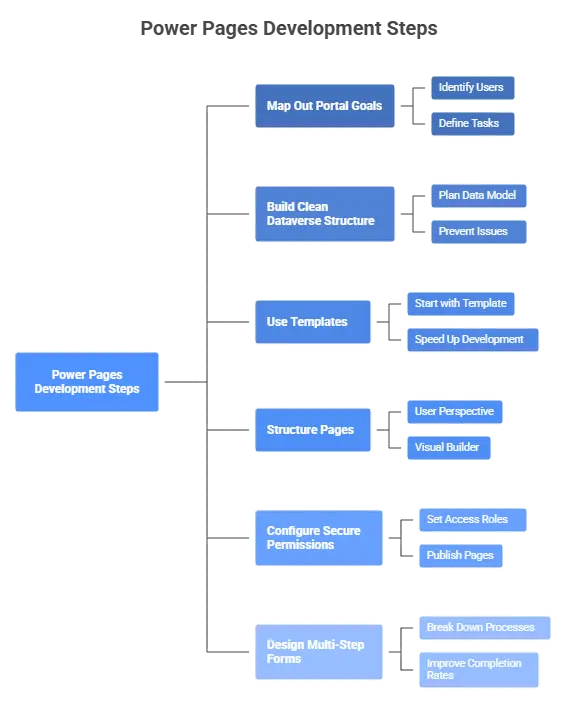
Steps Developers Should Take to Make the Most of These Features
Just like the example blog you shared included a practical “Steps” section, here is one tailored to your topic:
- Step 1: Map Out the Portal Goals
Identify who will use the portal and what tasks they need to complete. - Step 2: Build a Clean Dataverse Structure
A well-planned data model prevents future issues. - Step 3: Use Templates Where Applicable
Start with a base template to speed up development. - Step 4: Structure Pages Through the Visual Builder
Lay out pages from the user’s perspective first. - Step 5: Configure Secure Permissions Early
Set access roles before publishing pages. - Step 6: Design Multi-Step Forms
Break down long processes to improve completion rates. - Step 7: Use Themes to Match Branding
Apply consistent colors, fonts, and layout settings. - Step 8: Add AI Assistance With Copilot
Use Copilot to draft content or layouts quickly.
Transforming Low-Code Development With Power Pages
Power Pages isn’t just a website builder—it’s a robust, enterprise-ready platform that combines security, design, automation, and data governance. When developers understand the Design Studio deeply, they can build portals that are scalable, modern, and aligned with business goals.
At Codevision Technologies, we’ve seen how these seven features help organizations streamline onboarding, improve customer experience, automate submissions, and centralize data—all without writing heavy code.
This is why Power Pages is becoming a key part of digital transformation strategies across industries.
Conclusion
Mastering Power Pages Design Studio is no longer optional for low-code developers. These seven features help you design faster, build smarter, and deliver more reliable solutions.
With the right guidance, businesses can turn Power Pages into a powerful portal framework that improves operations, enhances customer experience, and supports long-term scalability.
Frequently Asked Questions
Microsoft Power Pages Design Studio is a low-code, user-friendly workspace that helps teams build secure and scalable business portals. It combines visual design tools, Dataverse integration, and enterprise-grade security. At Codevision Technologies, we use the Design Studio to help clients create high-performance portals with minimal custom coding.
Power Pages is designed for both. Low-code developers can build structured, data-driven portals, while non-technical users can easily manage layouts and content using the visual tools. This mixed accessibility is one reason many of Codevision Technologies’ clients choose Power Pages to streamline internal and customer-facing processes.
You can build a wide range of portals, including:
- Customer self-service portals
- Vendor onboarding portals
- HR onboarding platforms
- Community and membership portals
- Knowledge base sites
- Appointment scheduling systems
- Service request and support portals
Yes. Power Pages allow developers to create multi-step forms with conditional fields, validation rules, and logic-driven workflows. This is especially useful for complex applications like job submissions, vendor onboarding, loan applications, or service requests.
Power Pages includes enterprise-grade security features such as:
- Role-based access control
- Table permissions
- Field-level security
- Authentication integration
- Secure Dataverse storage
This ensures users only see data they are authorized to view.
Absolutely. Templates provide pre-built pages, layouts, and data models that reduce development time significantly. They are ideal for projects where teams need a head start while still keeping room for customization.
Yes. The theme and styling system allows you to customize fonts, colors, layouts, buttons, spacing, and more. You can also inject custom CSS for advanced branding needs.
Dataverse acts as the central data engine for Power Pages. It ensures clean storage, relational data structures, security, validation, and deep integration with Power Automate and Power Apps—making portals scalable and reliable.
Copilot assists developers by generating layouts, drafting content, suggesting improvements, and guiding users through complex configuration steps. It speeds up prototyping and reduces repetitive manual work.
Because these features—visual builder, multi-step forms, templates, theme control, security, Dataverse integration, and Copilot—directly influence speed, usability, scalability, and overall portal quality. Mastering them leads to stronger, more reliable, and more efficient solutions.
Yes. Power Pages is designed for enterprise use with capabilities like advanced security, high scalability, Dataverse support, role-based controls, and integration with Microsoft Power Platform and Azure.
Codevision Technologies provides expert Power Pages development, including portal design, Dataverse modeling, custom integrations, workflow automation, branding, security configuration, and end-to-end implementation—ensuring portals are fast, secure, and business-ready.